Why is Nilo Slow or Laggy?
Last updated 6 months ago
Enable Hardware Acceleration
Nilo runs in your browser, and requires a few settings to be enabled to work properly.
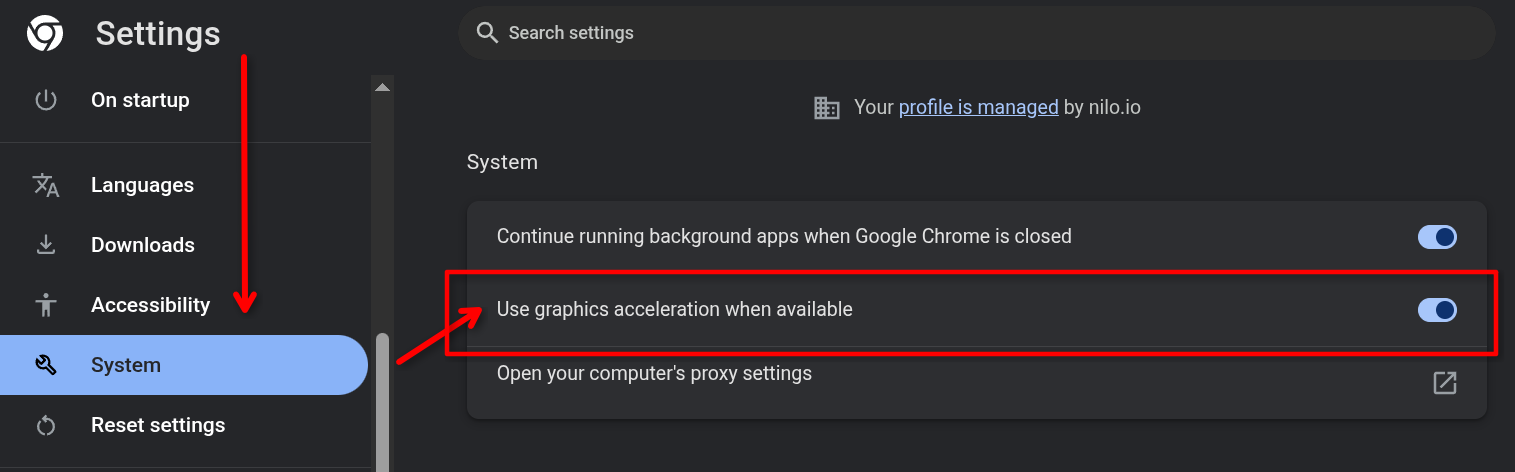
For optimal performance in Nilo, please ensure that Graphics (or Hardware) Acceleration is enabled in your browser settings. In Chrome, go to Settings > System and toggle "Use graphics acceleration when available"
Optimize your Objects
If the World you are in has a lot of unoptimized objects, it can start to lag your system. To optimize objects, reduce their polygon count using the Level of Detail (LOD) slider.
You can find the LOD slider in the Inspector Panel on an object under the Model section.
Deleting unneeded objects can also help with your performance.

If Nilo continues to lag, make sure you meet the minimum system requirements in our Technical Support documentation.